Back
Back

 +
+




Patching Tutorial
Patching?
One of the great things about getting into video game emulation is that (1) you can play games in English that were never officially released in English, and (2) play your favorites games in a whole new way with ROM hacks. ROM hacks such as hacks that increase the game's difficulty, rearrange all the stages to create an entirely new game, or replace the dialogue with perverted humor. In any case, to have these experiences you need to apply an IPS patch to a video game ROM.
Auto Patching with RetroArch, Snes9x, and VBA
“Auto patching” (also called “soft patching”) is a feature that some emulators offer. It can automatically patch the game if the patch and the ROM have the same filename (don't change their file extensions). They both must be unzipped and in the same folder. And that's it! Here's an example:

That I know of, the following emulators support auto patching: RetroArch, Snes9x, VBA (Visual Boy Advance), and ZSNES. If the emulator you're using doesn't support auto patching, or if you're not sure, then skip to the next section talking about “manual patching”. In general, it's best to use RetroArch for auto patching because it supports it for a wide range of video game systems. Check out this page to learn more: Softpatching ROMs with RetroArch. I have a RetroArch tutorial, too.
Here are some step by step directions for auto patching:
- Firstly, if the directions that came with the patch state that an unheadered ROM is required, that's a separate process that needs to be done first: how to remove the header from a ROM.
- Unzip/extract the ROM from its zip file. If the patch is in a 7Z or RAR file, use 7-Zip (it's free) to extract it. The ROM file has either an SMC or FIG file extension (for SNES), or GBA file extension (for Game Boy Advance).
- Unzip/extract the contents of the English patch's zip file. The English patch is the file with the IPS file extension.
- Rename the English patch to match the name of the ROM. (As displayed in the above image with the big blue arrow)
*If the file extensions are NOT showing, go here for directions on how to show them. (Not required but makes it easier to destinguish between the files) - That's it, you're done :) Load up the game and it'll be English.
If there's more than one patch: Read the ReadMe file contained within the English patch's zip file to learn of the purpose of each patch. But if you download the patch from my site, then look under the patch's download link for a note. It'll tell you the exact patch you need to use.
Android/Mac/iOS users: Auto patching is not available. You need to manually patch ROMs.
About Manual Patching
With manual patching (also called “hard patching”), the IPS patch is permanently applied onto the ROM. Since manual patching is permanent, it's best to keep a backup of your ROM just in case.
Some notes:
- One benefit with manual patching is that it allows you to put the ROM back in a zip file. This'll save space on your computer, versus auto-patching which requires you to keep the ROM out of a zip file to work.
- You have to use manual patching in cases where two patches need to be applied to a ROM. Of the games covered in my site, manual patching must be used to apply the English patch + the bug fix to “Front Mission”, and the English patch + English dubbing patch to “Tales of Phantasia”.
How To Patch on Windows
The patching utility most people prefer is Lunar IPS. Click the following link to download it:
Download Lunar IPS 58.4 KB
I created a video tutorial with (most of) the directions posted on this page:
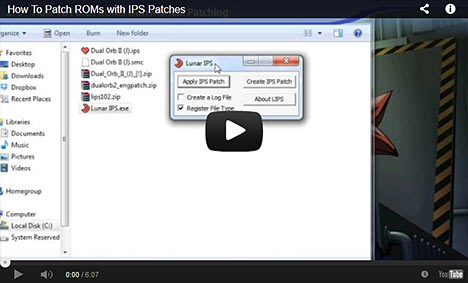
My video doesn't cover removing a ROM header, which is sometimes required. If videos aren't your thing, read my step-by-step directions:
- Firstly, if the directions that came with the patch state that an unheadered ROM is required, that's a separate process that needs to be done first: how to remove the header from a ROM.
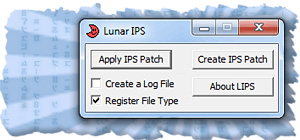
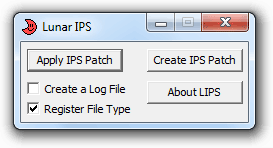 Make sure the patch is on your desktop and unzipped from its ZIP file. If the patch is in a 7Z or RAR file, use 7-Zip (it's free) to extract it. When you're ready, open Lunar IPS by double-clicking on
  .
.- Click on the
 button.
 - The “Select IPS File to Use” window will pop up.
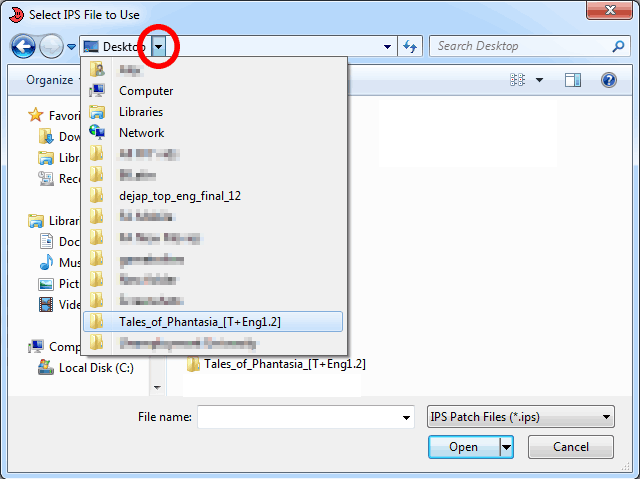
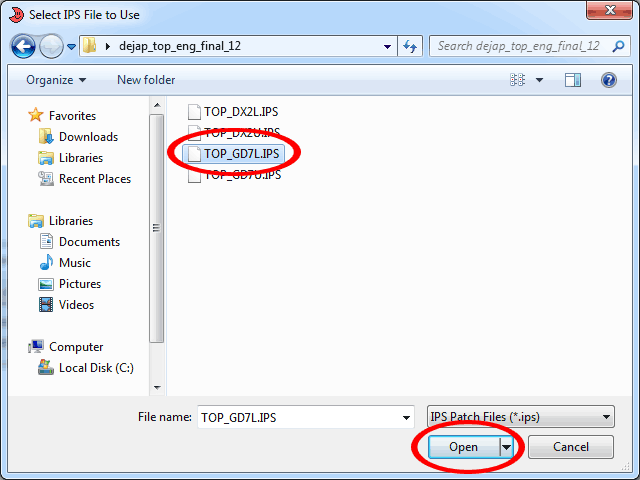
Click the notch in the top bar to choose the directory or folder that your patch is in. If you unzipped the patch as I said in Step #1 then you should see it in this list. - When you reach the folder that the patch is in, click on the patch then click Open, as shown here .
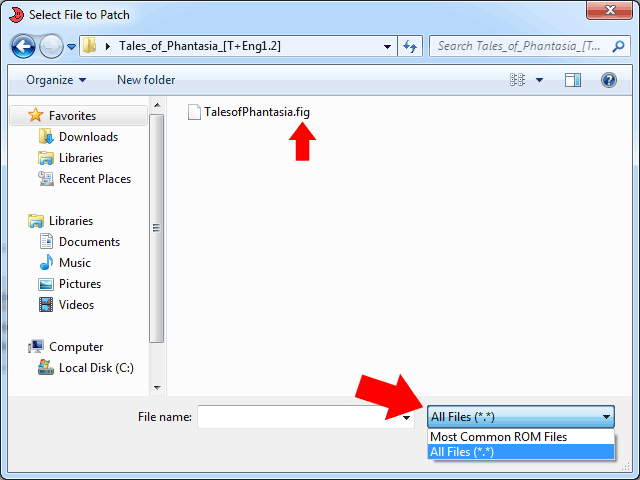
- The “Select File to Patch” window will pop up. Just like you did in Step #3 to find the patch, this time do the same thing to find the ROM you want to patch. Click on your ROM, then click Open.
Note: If you enter the folder containing your ROM and it's not showing up, set Lunar IPS to “All Files” to see it. To do so, click the box in the lower right , then click “All Files”. In my sample, “All Files” had to be clicked to show Tales of Phantasia because it's in FIG format (not that many SNES ROMs are in FIG format).
And that's it! You should see a “The file was successfully patched” message.
How To Patch on Android
You can use UniPatcher to patch ROMs on an Android smarpthone or tablet. In addition to IPS patches, it also supports applying xDelta and BPS patches. It works the same way as Lunar IPS on Windows - just choose the IPS patch then choose the ROM, then poof it's patched. The only tricky part is that prior to using UniPatcher, the English patch and the ROM both must be extracted from their zip files. Unlike Windows, Android can't extract zip files by default. You'll need something like Astro File Manager to do that. Here are directions for unzipping files with Astro. If the patch is in a 7Z or RAR file, use ZArchiver (it's free) to extract it.
The tricky part is that if the ROM needs its header removed, using UniPatcher on its own won't work. You need to patch the game on a PC (or Mac). Or if the patch you're trying to use is popular, you may find a pre-patched ROM online.
*Don't have access to the Google Play Store? You can also download UniPatcher from RomHacking.net.
How To Patch on a Mac
You can use Multipatch to patch ROMs on iOS. It supports IPS, xDelta, BPS, and PPF patches.
I'm assuming you're using OpenEmu for emulation, as it is the most popular multi-system emulator on OSX. If you were wondering, OpenEmu does not support auto-patching (or softpatching). Manually patching ROMs with Multipatch is your only option.
If a ROM needs its header removed, you can do that with NSRT  (8.59 MB).
If the patch you downloaded is in a 7Z or RAR file, you can use Unarchiver or Keka to extract it (these apps are free).
How To Patch on a Chromebook/Chrome OS
Most Chromebooks these days have the Play Store. In the Play Store, look for UniPatcher. That app will let you patch ROMs with any patch format (IPS, xDelta, etc.).
If you have an older Chromebook without the Play Store, you can patch ROMs online with RomPatcher.js. The tricky part is that if the ROM needs its header removed, patching it online won't work. You need to patch the game on a PC (or Mac). Or if the patch you're trying to use is popular, you may find a pre-patched ROM online.
Removing a ROM Header
Many ROM hacks and translations require the header of the ROM to be removed before applying the patch. They normally state this in the directions, but not always. If a ROM you patched isn't working (it gives you just a black screen), try removing the header on a fresh unpatched ROM and try patching again.
Here are directions on how to remove the header of a ROM:
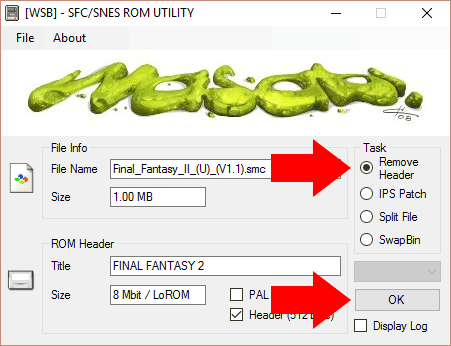
- Download SNES ROM Utility (31 KB). This is for Windows.
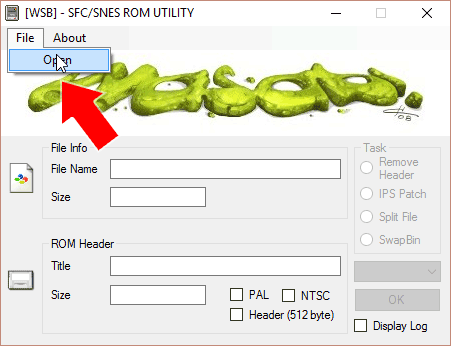
- In SNES ROM Utility, go to File > Open and load your ROM, as shown here .
- Click “Remove Header” then click OK, as shown here .
- That's it! You should be prompted with this message: “New file created without header!”, and in the same folder where you ROM is located there should be a new ROM with 'headerless' in the filename.
*If SNES ROM Utility is giving you issues, TUSH is a good alternative.
*On a Mac? Use NSRT (8.59 MB)
When a patch doesn't come with directions
That really sucks if you download a patch and it doesn't come with any documentation (or a ReadMe text file). Or maybe the patch did come with documentation, but they neglected to provide directions. Without directions you don't know what version of the ROM you need to patch. You also don't know if you need to patch a headerless ROM or not. So what do you do? You need to rule out the uncertainty of ROM versions and headerless ROM. Try my two strategies:
Strategy #1: Rule out ROM versions - Go to a ROM site such as Archive.org, which distributes every version of a ROM. To search Archive.org, type “archive.org [system] collection” in Google. For example, for SNES search for archive.org snes collection and in Archive.org look for Download Options . Anyhow, apply the patch to every ROM in the collection. Test every ROM to see if the patch worked with either of them. If that doesn't work, try the next strategy...
Strategy #2: Rule out headerless - Using the same ROMs from Archive.org (fresh ROMs you haven't patched yet), remove the header from every ROM and then patch each ROM. Test every ROM to see if that works.
One of the above two strategies must work. If they don't work then there must be an important detail that you may be overlooking. Double-check the region (North America, Europe, etc.). Double-check everything. Even double-check details that might seem silly. For example, maybe you were trying to patch a Game Boy Classic version of Pokemon, but you actually downloaded the Game Boy Advance version by mistake.
Patching with xDelta, BPS, and PPF files
This guide focuses on IPS patch files, which is the most popular and most used file format for patches. However, there are a couple of other patch file formats that ROM hackers & translators sometimes use.
- xDelta Patches - This format is probably the second-most popular under IPS. Delta Patcher is recommended for patching with xDelta files.
- BPS Patches - This format started with N64 hacks. Its popularity expanded to support SNES and every other classic system. You can use beat for patching with BPS files.
- PPF Patches - This format is popular with PlayStation 1, PSP, and N64 hacks. PPF-O-Matic is recommended for patching with PPF files.
Using the patching utilities recommended above are the same way you use Lunar IPS: all you do is select the patch, select the ROM, and then click Patch.
Q: I'm getting a “Bad Checksum” error
So you start up your patched game in your favorite SNES emulator and the first thing it gives you is a “bad checksum” error on the bottom of the screen (shown below). Don't worry! This is supposed to happen. It just means the English patch or modification/hack patch increased the size of the ROM, hence the checksum is different. As long as the game starts up normally after this message then everything is fine and nothing is broken or corrupt.

Q: After I patch a game I get a black screen
You more than likely overlooked a detail. Read the ReadMe text file contained with the patch. It should have important details you need to know before applying the patch.
For example, a specific version of the ROM may be required. Did you know “Final Fantasy III (US)” actually has two versions? Version 1.0 and version 1.1 (it's specified in the filename). Some ROM hacks require one or the other. Or maybe a ROM hack requires a specific region for a game. Most of us are from the United States, so we assume the North American version is what we need to use. However, sometimes ROM hacks require the European version.
If you're still having trouble, maybe this other FAQ question can help: When a patch doesn't come with directions
*If you're using a cycle-accurate emulator such as BSNES or Higan, try another SNES emulator.
Q: My patched ROMs don't work with Higan/BSNES
You'd need to try another SNES emulator then. Higan is a 'cycle-accurate' emulator intended to run like a real SNES system. If a ROM hack or translation wouldn't work on the real SNES, then it wouldn't work on Higan.
Q: I can't patch Super Mario World!
If you're having trouble patching Super Mario World with a ROM hack, your issue will most likely be resolved by using ROMclean on your ROM. This utility only works with Super Mario World.
Q: Can I patch for the NES/SNES Classic or Everdrive?
You've probably hacked your NES Classic Mini or SNES Classic Mini to load any game you want (if you don't know how, YouTube has tons of tutorials). Or perhaps you have an Everdrive cart for playing ROMs on a real SNES or other system. So, do hacks work on them? I think it's safe to assume that most ROM hacks and translations will work on them. The ROM hacks that wouldn't work are the ones that used emulator-specific hacks to work.
How do you find out which ROM hacks wouldn't work? That's easy - use a cycle-accurate emulator such as BSNES or Higan. Don't use Snes9X or ZSNES, as they are not cycle-accurate. If you do find that a certain ROM hack or fan translation doesn't work (and you're absolutely sure it's patched correctly), there might be a fix. With the rise of popularity with repo carts, people have released fixes for certain popular fan translations that used emulator specific hacks. I think RomHacking.net has them.
Q: How can I load patched ROMs onto the RetroN 5?
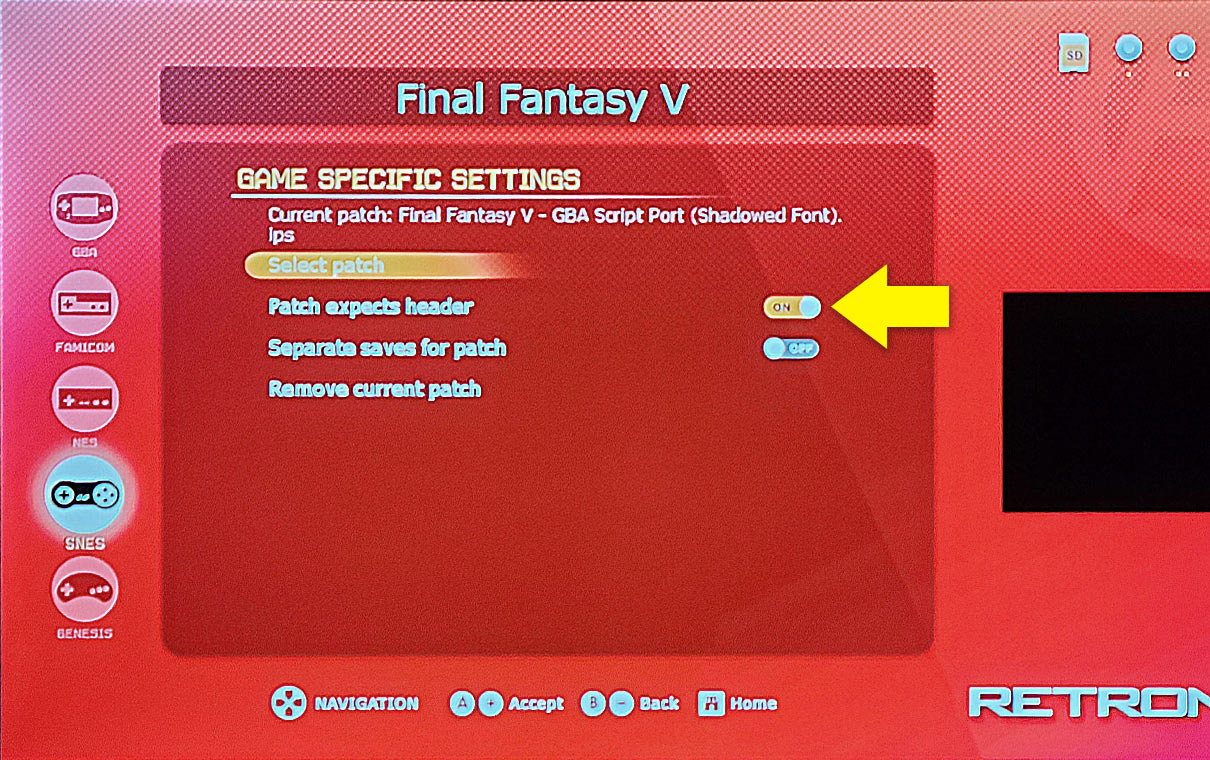
You don't need to do anything special to load patched ROMs onto the RetroN 5. You load patched ROMs the same exact way you load regular ROMs. Don't know how to load ROMs onto it? Check out these videos to learn how.
What's cool is that the RetroN 5 supports auto-patching. It even has a toggle for patches that need a headerless rom to work. But don't ask me how this works because I don't have a RetroN 5.
What's the RetroN 5? It's a popular console released in 2014 that can play your original carts for NES, SNES, Genesis, Game Boy, Game Boy Color, and GBA; including support for the Japanese carts of these systems. Via an SD card you can also play ROMs on it (as explained in the video linked above). You can buy the RetroN 5 on Amazon for around $200.
Q: Where can I find ROM hacks and translations?
That's easy. Just go to RomHacking.net. That website contains the largest repository of ROM hacks and translations on the Internet.